
Templates / Guide
Guide · Updated October 11, 2026
How to Make the Hotel Lobby AI Video
Two clear photos, one locked-off performance. This page is the Hotel Lobby prompt, the six variants, and the mistakes that make the faces swap.
The quick answer
To make a Hotel Lobby-style AI video, upload one clear front-facing photo for each performer, preview the source clip, choose 8 or 15 seconds and 480p or 720p, then generate. Trendeo supplies the source performance and embedded audio. A personalized 8-second 480p render uses 10 credits, available in the $7.99 first-video pack. The preview and prompts are free.
What the Hotel Lobby trend is
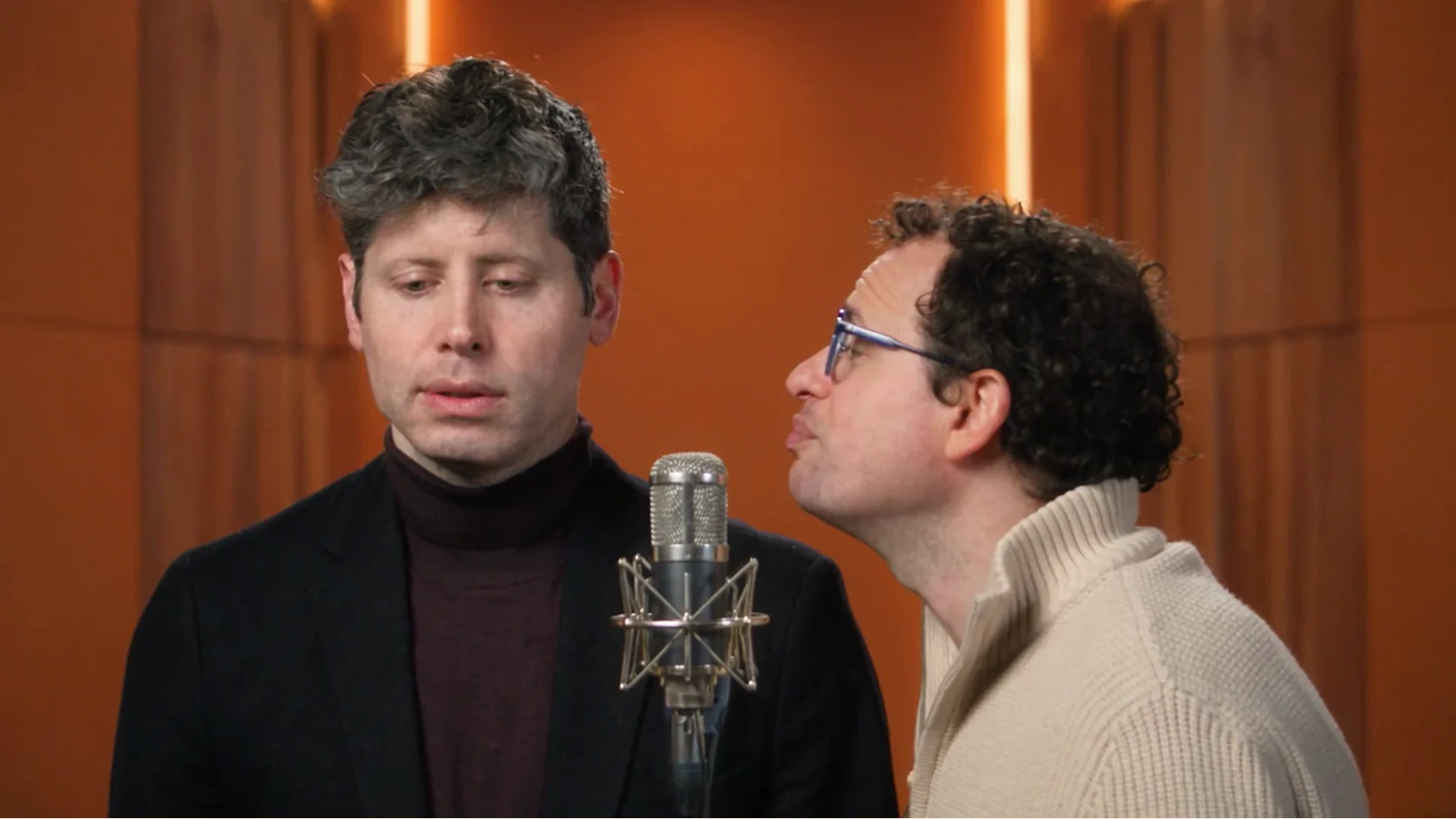
The clip people are remaking is a rap performance in an orange COLORS booth. The camera does not move. One microphone stands in the center. Two performers take the beat: one raps, the other nods and reacts. The cultural source is Quavo and Takeoff’s COLORS performance of “Hotel Lobby.”
Search pages call this a Hotel Lobby generator, a Hotel Lobby AI filter, or a Hotel Lobby face swap. Trendeo attaches prepared 8- and 15-second source performances to the generator, then asks the model to replace the visible performers with the people in your photos while preserving the source timing and sound.
Where the method comes from
The motion-transfer method comes from Higgsfield’s Genjutsu feature. Genjutsu aims to keep the source performance, timing, camera and sound, then rebuilds the people from reference photos. Higgsfield provides the model; Trendeo provides the prepared source, cast map and prompt.
A Genjutsu source clip can be between 4 and 30 seconds. Trendeo uses two reference images for this template, which is the whole cast. You do not paste a video in. The prepared source stays attached to the selected duration.
What to prepare
- Two JPG or PNG photos. One face in each, front-facing, nothing covering the face.
- Different people on the left and the right, unless you picked Solo.
- No source-video upload. Trendeo supplies a prepared 8- or 15-second landscape performance.
- Generation time depends on the queue. Your finished 16:9 MP4 appears automatically, with no Trendeo watermark.
- Permission to use the faces and enough credits for the duration and quality you select.
The Hotel Lobby prompt
This is the prompt the generator sends for two friends. It preserves the source motion, background and soundtrack, locks who leads and who reacts, and lists the failures to avoid.
Prompt template
PRESERVE: Keep every bit of motion, timing, cuts, camera position, framing and
performance from the source clip. Locked-off camera, no movement.

CHANGE:   Replace the two performers with the people in Reference Image 1 (left)
and Reference Image 2 (right).

SETTING:  Preserve the source clip's background, lighting and microphone exactly.

CAST LOCK: Left person raps; right person nods and reacts.
           Never swap their identities.

AUDIO:    Preserve the source clip's embedded audio and its exact timing.
          Do not add, replace or remix the soundtrack.

AVOID:    identity drift, faces swapping between the two characters, extra people,
warped hands, changing outfits, camera moves, text, logos, watermarks.
Generate this versionWhy the prompt is written in six blocks
A short request such as “put these people in the Hotel Lobby video” leaves too many decisions open. The model can move the camera, swap the two faces, change the costumes, or build a new orange room. The structured prompt closes those choices in a readable order.
Preserve
Keeps motion, timing, cuts, framing, and the locked camera from the source performance.
Change
Maps Reference Image 1 to the left performer and Reference Image 2 to the right performer.
Setting
Preserves the selected source background, lighting, framing and microphone when present.
Cast lock
States who raps and who reacts, then explicitly forbids the two identities from swapping.
Audio
Preserves the audio embedded in the selected source and forbids replacing or remixing it.
Avoid
Blocks extra people, face drift, warped hands, changing outfits, text, logos, and watermarks.
Hotel Lobby AI template
Same booth, same camera, six casts. Copy any of them, or open the generator and pick the matching card. The tool sends the prompt for you.
Two friends
PRESERVE: Keep every bit of motion, timing, cuts, camera position, framing and
performance from the source clip. Locked-off camera, no movement.

CHANGE:   Replace the two performers with the people in Reference Image 1 (left)
and Reference Image 2 (right).

SETTING:  Preserve the source clip's background, lighting and microphone exactly.

CAST LOCK: Left person raps; right person nods and reacts.
           Never swap their identities.

AUDIO:    Preserve the source clip's embedded audio and its exact timing.
          Do not add, replace or remix the soundtrack.

AVOID:    identity drift, faces swapping between the two characters, extra people,
warped hands, changing outfits, camera moves, text, logos, watermarks.
Generate this versionCouple
PRESERVE: Keep every bit of motion, timing, cuts, camera position, framing and
performance from the source clip. Locked-off camera, no movement.

CHANGE:   Replace the two performers with the couple in Reference Image 1 (left) and Reference Image 2 (right).

SETTING:  Preserve the source clip's background, lighting and microphone exactly.

CAST LOCK: The pair is a couple. Left person raps; right person nods and reacts.
           Never swap their identities.

AUDIO:    Preserve the source clip's embedded audio and its exact timing.
          Do not add, replace or remix the soundtrack.

AVOID:    identity drift, faces swapping between the two characters, extra people,
warped hands, changing outfits, camera moves, text, logos, watermarks.
Generate this versionPet + owner
PRESERVE: Keep every bit of motion, timing, cuts, camera position, framing and
performance from the source clip. Locked-off camera, no movement.

CHANGE:   Reference Image 1 replaces the performer on the left (the owner). Reference Image 2 replaces the performer on the right with their pet.

SETTING:  Preserve the source clip's background, lighting and microphone exactly.

CAST LOCK: The owner stays on the left and raps. The pet stays on the right and reacts.
           Keep the pet's real species and anatomy. Never turn the pet into a second human. Never swap identities.

AUDIO:    Preserve the source clip's embedded audio and its exact timing.
          Do not add, replace or remix the soundtrack.

AVOID:    identity drift, faces swapping between the two characters, extra people,
warped hands, changing outfits, camera moves, text, logos, watermarks.
human face on the pet, extra limbs
Generate this versionBrothers
PRESERVE: Keep every bit of motion, timing, cuts, camera position, framing and
performance from the source clip. Locked-off camera, no movement.

CHANGE:   Replace the two performers with the brothers in Reference Image 1 (left) and Reference Image 2 (right).

SETTING:  Preserve the source clip's background, lighting and microphone exactly.

CAST LOCK: The pair is two brothers. Left person raps; right person nods and reacts.
           Keep both faces distinct. Never swap their identities.

AUDIO:    Preserve the source clip's embedded audio and its exact timing.
          Do not add, replace or remix the soundtrack.

AVOID:    identity drift, faces swapping between the two characters, extra people,
warped hands, changing outfits, camera moves, text, logos, watermarks.
Generate this versionSolo
PRESERVE: Keep every bit of motion, timing, cuts, camera position, framing and
performance from the source clip. Locked-off camera, no movement.

CHANGE:   Replace both performers with the person in Reference Image 1. Use Reference Image 1 for both performers.

SETTING:  Preserve the source clip's background, lighting and microphone exactly.

CAST LOCK: One identity only. The left figure raps; the right figure nods and reacts.
           Never invent a second person. Never swap in a stranger.

AUDIO:    Preserve the source clip's embedded audio and its exact timing.
          Do not add, replace or remix the soundtrack.

AVOID:    identity drift, faces swapping between the two characters, extra people,
warped hands, changing outfits, camera moves, text, logos, watermarks.
Generate this versionCartoon avatar
PRESERVE: Keep every bit of motion, timing, cuts, camera position, framing and
performance from the source clip. Locked-off camera, no movement.

CHANGE:   Replace the two performers with cartoon avatars of Reference Image 1 (left) and Reference Image 2 (right). Flat color, clean outlines, same faces.

SETTING:  Preserve the source clip's background, lighting and microphone exactly.

CAST LOCK: Left avatar raps; right avatar nods and reacts.
           Never swap their identities.

AUDIO:    Preserve the source clip's embedded audio and its exact timing.
          Do not add, replace or remix the soundtrack.

AVOID:    identity drift, faces swapping between the two characters, extra people,
warped hands, changing outfits, camera moves, text, logos, watermarks.
photoreal faces mixed into cartoon bodies
Generate this versionMistakes that break the shot
- A side profile, sunglasses, or a hand across the mouth. The face has to be readable.
- A group photo. One person per still, or the model invents a crowd.
- Two people who look almost the same. That is the fastest way to get a face swap you did not ask for.
- A heavy beauty filter on the still. Identity lock works better from a plain photo.
- Uploading a source video. The prepared performance is already included, so you only need the cast photos.
- Asking for a camera move. The locked-off frame is why the booth holds together.
If you are using Trendeo, choose the cast preset before uploading. The generator applies the matching cast lock automatically. If you are working directly in Genjutsu, copy the closest variant above and keep the Preserve and Avoid blocks intact.
Before you publish the finished video
Watch the complete clip once with sound. Check the left and right faces at the beginning, midpoint, and final beat; face drift often appears only for a few frames. Confirm that no logo, unexpected text, or third person has appeared. The Orange Booth export should retain the prepared 16:9 framing.
Crop only if a platform adds unwanted padding. Avoid re-framing the video horizontally because the locked composition and center microphone are part of what makes the Hotel Lobby AI template recognizable. When you are ready, return to the Hotel Lobby AI video generatoror compare it with the Walk It Talk It carpool template.
FAQ
What is the Hotel Lobby AI video?
It is a two-person microphone-duet template inspired by the viral format. Trendeo supplies a prepared 8-second orange-booth or 15-second source performance, with each clip's embedded audio. You cast its roles with photos.
How do I make a Hotel Lobby AI video from two photos?
Pick a two-person cast, upload one clear front-facing JPG or PNG for the left performer and one for the right, choose an available duration and resolution, then generate. You can play the actual template before paying. No source-video upload or prompt writing is required.
Does the Hotel Lobby AI video have sound?
Yes. The current Orange Booth source includes audio, and the generator asks the model to preserve it in the result. Play the source preview with sound and check your completed video before sharing.
Is the Hotel Lobby AI video free?
The source preview and prompt guide are free to watch and read. A personalized render uses credits. One 8-second 480p template render costs 10 credits; the first-video pack provides exactly 10 credits for $7.99. Longer or higher-resolution renders need more credits.
Do I need the original video clip?
No. You do not upload a video. Trendeo supplies a prepared source performance in the selected length. You only upload photos: one clear front-facing face each, with nothing covering the face.
How many credits does it use?
The eight-second 480p short uses 10 credits; eight-second 720p uses 21. The full fifteen-second effect uses 18 credits at 480p or 37 credits at 720p. Sign in to keep one balance across every template. Failed renders return the full amount.
Why do the two faces drift or swap?
Generative video can make identity or lip-sync mistakes, especially with side-on, covered, or group photos, or two similar-looking people. Use one clear front-facing face per photo. Trendeo's prompt assigns left and right roles but cannot guarantee perfect identity or mouth movement; review the finished video.
Can I do it with one person, or with a pet?
Yes. Solo uses one photo and keeps a single identity. Pet + owner puts a person on the left and a pet on the right. Cartoon avatar keeps the same performance and draws both people. Pick the template, then generate.
What's the best prompt for the Hotel Lobby template?
Use the preserve, change, setting, cast lock, audio, and avoid prompt on the guide. It locks the camera, pins who is on the left and who is on the right, and tells the model to preserve the selected source clip's background, performance timing, and embedded audio. This page sends that prompt for you.